

- Автор темы
- Администратор
- Модер.
- Команда форума
- #1
Compatible XF 2.x versions 2.3
Make every resource page count — for search engines, social sharing, and your readers.
XFRM SEO Boost is a free, zero-config add-on for the XenForo Resource Manager. It adds the four things every resource owner cares about: a featured image, proper SEO meta, smart Schema.org output, and a sticky sidebar — all without touching XFRM templates.
Choose where the featured image appears on each resource page. The same image is also used as og:image for social sharing, regardless of which display mode you pick.
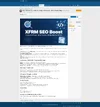
Mode A — Show at top of content (hero banner)
The featured image renders as a full-width banner above the resource description. Best for visual resources, tutorials, and articles.
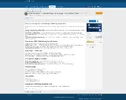
Mode B — Show in sidebar (default)
A clean thumbnail at the top of the resource sidebar, between the title and the metadata block. The most balanced option for general use.
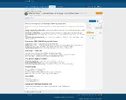
Mode C — Don't display (image only used for sharing)
The image is hidden on the page entirely, but og:image still goes out for Facebook, Twitter/X, LinkedIn, WhatsApp, etc. Use this when your resource has its own internal hero image and you don't want a duplicate.
Make every resource page count — for search engines, social sharing, and your readers.
XFRM SEO Boost is a free, zero-config add-on for the XenForo Resource Manager. It adds the four things every resource owner cares about: a featured image, proper SEO meta, smart Schema.org output, and a sticky sidebar — all without touching XFRM templates.
Choose where the featured image appears on each resource page. The same image is also used as og:image for social sharing, regardless of which display mode you pick.
Mode A — Show at top of content (hero banner)
The featured image renders as a full-width banner above the resource description. Best for visual resources, tutorials, and articles.
Mode B — Show in sidebar (default)
A clean thumbnail at the top of the resource sidebar, between the title and the metadata block. The most balanced option for general use.
Mode C — Don't display (image only used for sharing)
The image is hidden on the page entirely, but og:image still goes out for Facebook, Twitter/X, LinkedIn, WhatsApp, etc. Use this when your resource has its own internal hero image and you don't want a duplicate.
2. Per-resource SEO meta override
Every resource gets four override fields directly on its edit page:- Meta title — overrides the HTML <title> and og:title (recommended 50–60 chars)
- Meta description — overrides meta name="description" and og:description (recommended 150–160 chars)
- Focus keyword — guidance only, helps you stay on topic while writing meta fields (not output to HTML)
- Canonical URL — overrides <link rel="canonical"> when the same content lives at multiple URLs
XFRM SEO Boost 1.0.0
Для просмотра скрытого содержимого вы должны войти или зарегистрироваться.

